Find personal information in text and mask it before it goes anywhere.
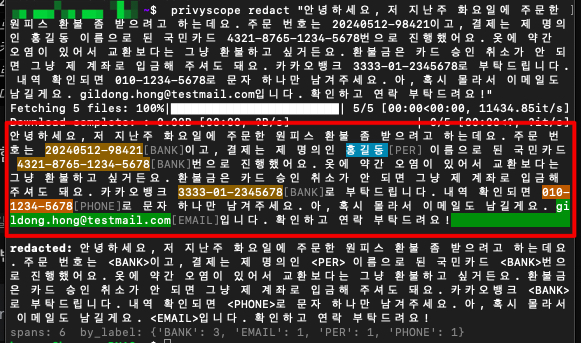
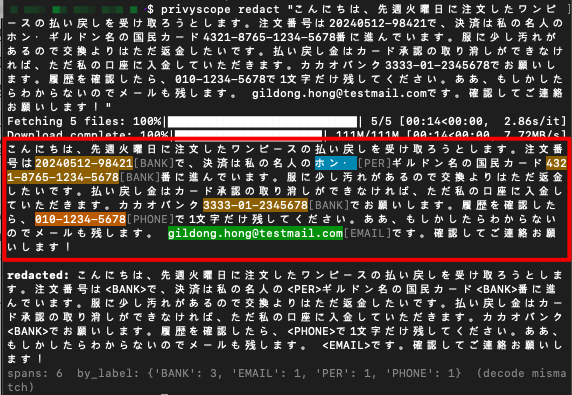
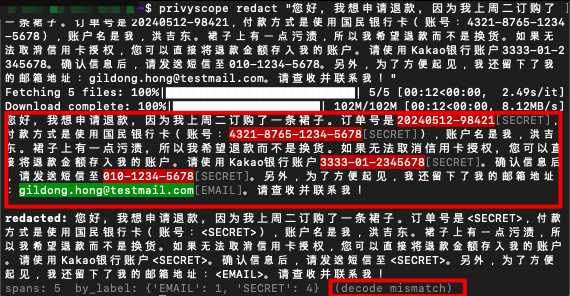
privyscope reads Korean, Japanese, English and Chinese, finds names, phone numbers, ID numbers, addresses and secrets, and replaces each one with its label. Detection runs on your machine; the model weights download once from Hugging Face.
Two detectors, then a merge
Some personal information has a fixed shape, and some only shows up from context. privyscope uses a different tool for each, then combines the results.
Stage 1 is a regex filter. It matches phone numbers, ID numbers, card numbers and email addresses. A rule can also call a verifier, such as a Luhn check, a national-ID checksum or a surname list, so a number that only looks like an ID is left alone.
Stage 2 is a tagging model. An ONNX model labels every token, which is how it finds names and addresses that no regex can match reliably.
The merge is a union. When both stages find the same kind of entity in the same place, the regex span is stretched to cover both, so a coarse address pattern cannot cut off the rest of the address the model saw. When they disagree about the kind, the regex wins, because a checked structure is more trustworthy than a guess.
Why the tagger cannot produce a broken mask
For each token the model scores five tags: Begin, Inside, End, Single, and Outside. Picking the best tag token by token can give nonsense, such as an Inside tag with no Begin before it, and that would leave half a name unmasked. Viterbi decoding avoids this. It finds the highest-scoring path through the tags, and only transitions that make sense are allowed. The transition scores are learned during training.
Press Step to walk the decode, or Play to run it again.
What is different about it
Five tags, not three. Most taggers use Begin, Inside and Outside. privyscope adds End and Single, so the model learns where an entity stops as well as where it starts. That matters most in Chinese, Japanese and Korean, where a particle often follows a name with no space between them.
Constrained decoding. The Viterbi step described above keeps every output well-formed, so masks do not come out in fragments.
It reads PII-shaped text before it is taught to tag it. Masked-language-model training on sentences from the training corpus comes first, with name, place and ID tokens masked more often, so the model has seen what names, addresses and ID numbers look like in running text before tagging starts.
Real training text. The training and validation data come from real-text corpora: Wikipedia, news and social-media sentences, public data and chat dialogues, and, for English, LLM-written documents. The model learns natural wording, not a fixed set of sentence templates.
What it finds
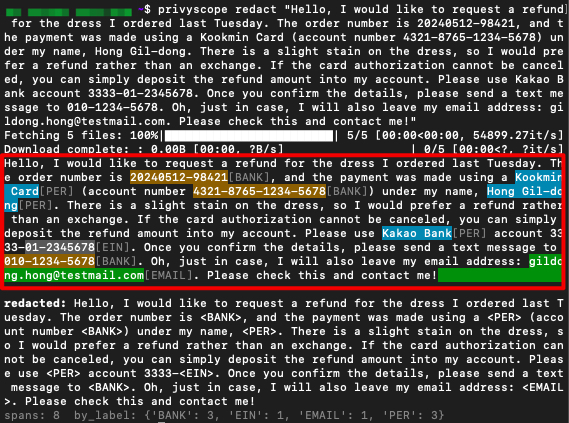
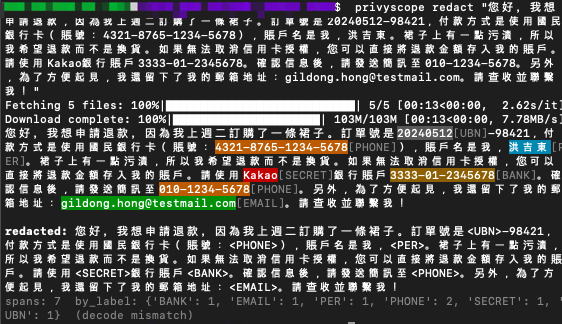
Eight entity types are shared by every language. Each is found by the regex stage, the tagging model, or both. Language packs can also emit locale-specific labels. The English screenshot below shows EIN, for example.
| Label | What it is | Found by |
|---|---|---|
| PER | Person name | Tagging model |
| PHONE | Phone number | Regex |
| ID_NUM | National or government ID number | Regex with checksum, plus model |
| Email address | Regex | |
| LOC | Detailed street address | Tagging model, plus regex |
| BANK | Bank account or card number | Regex with checksum |
| DATE | Private date, such as a birth date | Regex and model |
| SECRET | Password, API key or credential | Regex and model |
How well it works
The chart shows strict micro-F1: a detected span only counts if its label, start and end all match the reference. The score covers the full pipeline, regex and model together. It was measured on a random sample of 500 examples per language from a held-out validation set of real text: Wikipedia and social-media sentences, public-data and chat dialogues, and, for English, LLM-written documents. That is harder than template-generated text, so these numbers cannot be compared with earlier figures. The Japanese and Chinese sets label only names (PER) and places (LOC), so every other entity shows a dash. Treat the chart as a comparison between packs and not as a promise about your data.
To reproduce a number for a pack, run its evaluation on your own labelled file:
privyscope eval --lang en your_val.jsonlSimplified Chinese is scored with its pack default, the recall-oriented preset (operating point high_recall); LOC is its weakest entity (0.65, precision 0.60). Korean entities with only a handful of examples in the sample (EMAIL, ID_NUM, BANK) are left as dashes. On a 500-sentence sample of the KDPII chat-dialogue hold-out, Korean scores 0.882 micro-F1 (BANK 1.00, PHONE 0.99, DATE 0.99, EMAIL 1.00, ID_NUM 0.87, PER 0.74, LOC 0.83). With the balanced preset it scores 0.654, and the preset gain holds on a second 500-sentence sample (0.650 to 0.750); the same preset lowers the scores of English, Traditional Chinese and Korean, so those packs keep balanced. Japanese is scored on rows without auto-generated persona sentences.
View as a table
| Pack | Micro-F1 | PER | LOC | DATE | ID_NUM | BANK | PHONE | SECRET | Weakest entity | |
|---|---|---|---|---|---|---|---|---|---|---|
| Japanese (ja) | 0.670 | 0.84 | 0.52 | — | — | — | — | — | — | LOC 0.52 |
| Simplified Chinese (zh-hans) | 0.739 | 0.83 | 0.65 | — | — | — | — | — | — | LOC 0.65, PER 0.83 |
| Traditional Chinese (zh-hant) | 0.872 | 0.91 | 0.81 | — | — | — | — | — | — | LOC 0.81, PER 0.91 |
| English (en) | 0.842 | 0.93 | 0.86 | 0.94 | 1.00 | 0.87 | 0.92 | 0.85 | 0.68 | SECRET 0.68, PHONE 0.85, ID_NUM 0.87 |
| Korean (ko) | 0.794 | 0.78 | 0.77 | 0.89 | — | — | — | 1.00 | — | LOC 0.77, PER 0.78, DATE 0.89 |
Install and run
Install the pack for your language. It pulls in the core, so you do not install privyscope on its own.
pip install privyscope-en       # English
pip install privyscope-ko       # Korean
pip install privyscope-ja       # Japanese
pip install privyscope-zh-hans  # Simplified Chinese
pip install privyscope-zh-hant # Traditional ChineseOne command works with any combination of packs. With several installed, the language is detected for each text, or you can force it with --lang.
privyscope redact "John Smith 555-123-4567"
privyscope redact --lang ko "Call 010-1234-5678"
privyscope --version # lists the installed languagesFrom Python:
from privyscope import Privyscope

engine = Privyscope.from_pretrained(lang="en")
result = engine.redact("John Smith 555-123-4567")
print(result.redacted_text)   # for example: "<PER> <PHONE>"
print(result.summary) # span counts by labelWeights download on first use and are cached. To work offline, point cache_dir at a downloaded bundle. regex_only=True skips the model entirely, for structured data where the regex stage is enough.
BANK.One core, one small pack per language
The core holds the engine: the regex filter, the ONNX runtime and the privyscope command. It ships no language data. Each language pack adds only data: its regex rules, its entity configuration and a default weights repository. A pack registers itself as a plugin, and the core finds installed packs at runtime. That is why several languages can be installed together, share one core, and never fight over the command.